Meet us at SATIS show in Paris | 4-5 November 2026

EoleWrap
The Magic On-Prem Interface for your FFmpeg
12 Mars 2019
FFmpeg Made Simple for Media Operators and Production Teams
EoleWrap Standalone brings the power of FFmpeg to every media professional through an intuitive user interface.
Compatible with any FFmpeg version, it lets you easily create and share presets, trim content, apply logos and ready-to-use filters, launch batch transcoding jobs and monitor jobs in real time, all from a single application designed to simplify media operations and boost productivity.
Lorem ipsum dolor
Lorem ipsum dolor sit amet, consectetur adipisicing elit, sed do eiusmod tempor incididunt ut labore et dolore magna aliqua. Ut enim ad minim veniam, quis nostrud exercitation ullamco laboris nisi ut aliquip ex ea commodo consequat.
Lorem ipsum dolor
Lorem ipsum dolor sit amet, consectetur adipisicing elit, sed do eiusmod tempor incididunt ut labore et dolore magna aliqua. Ut enim ad minim veniam, quis nostrud exercitation ullamco laboris nisi ut aliquip ex ea commodo consequat.
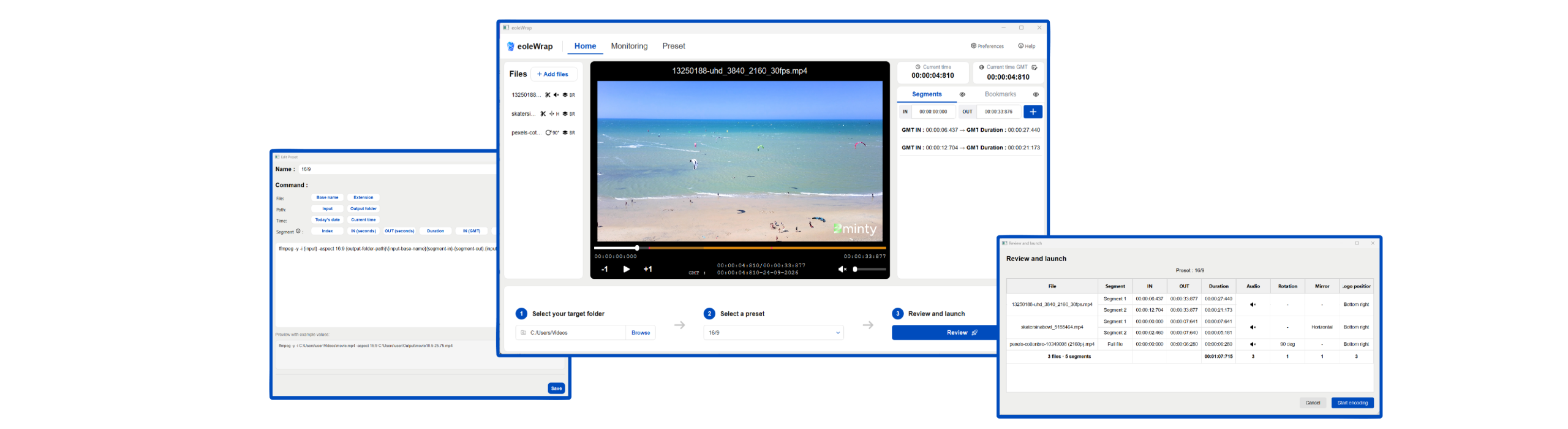
Key Features
FFmpeg Commands Library
Easily create, customize and reuse FFmpeg command templates through an intuitive visual interface.
Export & share presets, making transcoding accessible to every user.
Timeline-Based Media Editing
Upload and manage multiple videos, navigate through content and define precise In/Out timecodes directly from an intuitive timeline. Easily extract content segments for processing without requiring external editing tools.
Branding and Ready-to-Use Filters
Instantly apply preconfigured FFmpeg filters through an intuitive interface. Add logos, adjust positioning, apply rotation and mirroring, control audio settings and mute tracks when required.
Frame Accurate Video Player
Review content instantly before launching processing jobs. The integrated frame-accurate video player enables users to verify edits, validate selected segments and ensure processing parameters are correct before execution.
One-Click Transcoding Job
Apply presets, launch batch transcoding jobs and automatically export processed assets to user-defined destinations from a single interface.
Real-Time Monitoring Interface
Review transcoding configurations before launch and monitor processing status in real time through a dedicated monitoring dashboard.
Track active jobs, monitor progress and maintain full visibility over media processing operations.
Why EoleWrap?
Simplify FFmpeg Operations
Give every operator access to the full power of FFmpeg through an intuitive interface with seamless integration to any FFmpeg version.
More info? A demo? A quote?
Lorem ipsum dolor sit amet, consectetur adipisicing elit, sed do eiusmod tempor incididunt ut labore et dolore magna aliqua. Ut enim ad minim veniam, quis nostrud exercitation ullamco laboris nisi ut aliquip ex ea commodo consequat. Duis aute irure dolor in reprehenderit in voluptate velit esse cillum dolore eu fugiat nulla pariatur. Excepteur sint occaecat cupidatat non proident, sunt in culpa qui officia deserunt mollit anim id est laborum.
Demandez votre version d'essai
Frequently Asked Questions about EoleWrap
EoleWrap is an intuitive FFmpeg interface that enables media professionals to create presets, edit content, launch transcoding jobs and monitor processing operations without command-line expertise.
EoleWrap transforms complex FFmpeg command lines into reusable presets that can be created, shared and executed through a user-friendly graphical interface.
Yes. EoleWrap is designed to connect to and operate with any FFmpeg version, allowing organizations to keep their existing environment and workflows.
Yes. Technical teams can create and validate presets, then share them with operators who can execute advanced transcoding workflows without command-line knowledge.
Yes. EoleWrap includes a visual command template builder that allows users to create, customize, save and reuse FFmpeg presets.
Yes. Presets can be exported and shared, enabling organizations to standardize transcoding workflows and ensure consistent processing results.
Yes. Users can launch batch transcoding jobs and automatically export processed assets to user-defined destinations.
Yes. EoleWrap includes a timeline-based editor that allows users to define In/Out points and extract specific content segments before processing.
Yes. Users can apply logos, positioning, rotation, mirroring and audio adjustments through preconfigured FFmpeg filters.
Yes. EoleWrap includes a frame-accurate video player that allows users to review content and verify processing parameters before launching jobs.
Yes. EoleWrap provides a real-time monitoring interface that displays job status, progress and processing information.