
LOREM IPSUM
Eolementhe©: Saas transcoding
No in-house tools or looking to avoid heavy investment? Facing peak workloads that require scalable cloud resources? Eolementhe© brings together multiple transcoding engines to process your files quickly and efficiently.

EoleWrap: standalone transcoding
Simplify FFmpeg transcoding with an intuitive interface for creating and sharing presets, editing content, launching batch transcodes and monitoring jobs in real time.
Cambria FTC
Cambria FTC transcoding software imports and exports most of the digital video formats used by professionals, including H.264, HEVC, HDR and Sony XDCAM.
- REST API available
- Wide choice of codecs supported
- Transcoding speed greater than source file size
- Color correction filters
- Audio mapping filters
Transcoding in the cloud, with Eolementhe©
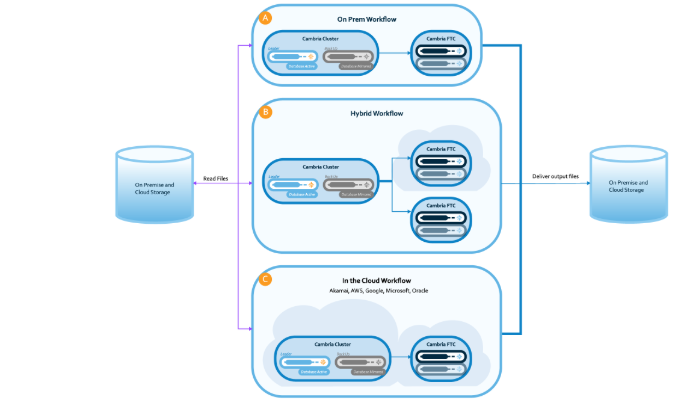
Eolementhe leverages several transcoding tools - Cambria FTC, Harmonic's WFS (still in use!) and the versatile FFMPEG - to support all current video formats, including broadcast-ready files, archives, SVOD, web, and more.
Choose your preferred tool and upload your own presets directly to the portal. Or let us create custom presets for you and select the solution best suited to your needs.
Looking for a quick and simple solution? Discover our EoleTransco ready-to-use packs — available for 26, 52 or 93 minutes video file — designed for immediate, hassle-free transcoding.
For monthly, annual, or pay-as-you-go options, feel free to contact us.
Technical & editorial metadata management
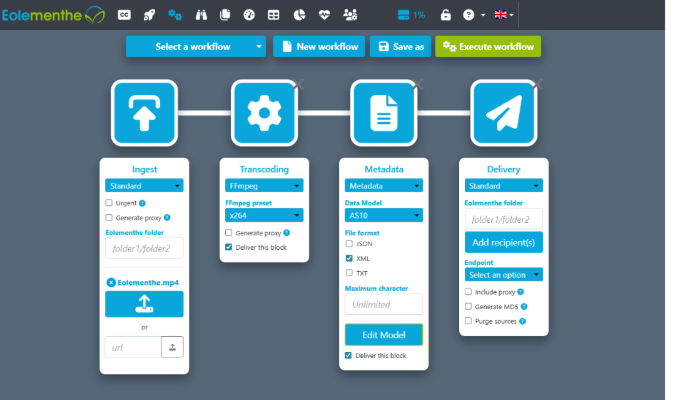
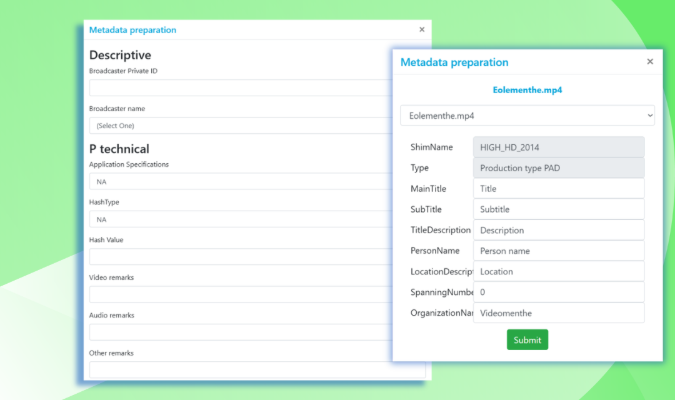
Do you want to supply your partner broadcaster, post producer or lab? To meet your partners' requirements, Eolementhe lets you add specific metadata forms (technical and editorial) to your transcoding workflow, such as metapad, AS10, etc., or a customized form.
The form can then be exported in PDF format for sharing with your collaborators!
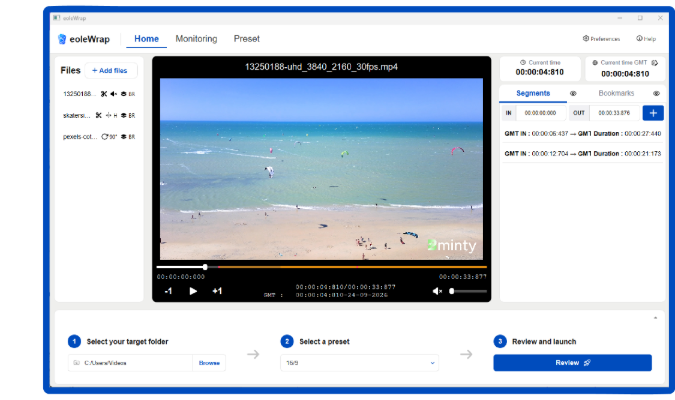
EoleWrap - The Magic On-Prem Interface for your FFmpeg
EoleWrap Standalone brings the power of FFmpeg to every media professional through an intuitive user interface. Compatible with any FFmpeg version, it lets you easily create and share presets, trim content, apply logos and ready-to-use filters, launch batch transcoding jobs and monitor jobs in real time, all from a single application designed to simplify media operations and boost productivity.
Key capabilities
-FFmpeg commands & presets library
-Timeline-based media editing
-Ready-to-use FFmpeg filters and branding tools
-Integrated frame-accurate video player
-One-click batch transcoding
-Real-time job monitoring
Use case: creation of broadcast-ready files with transcoding
Discover how regional channel, France 3 Nouvelle Aquitaine, uses the Eolementhe web platform
to make its files Ready-To-Broadcast and deliver them.